
HTTPS for a Domestic-Only Home Server — Let’s Encrypt DNS-01 + DuckDNS Wildcard
 If you turn on iptime’s “country-based access restriction (allow Korea only),” traffic from abroad gets blocked — and the HTTP-01 method, which validates over port 80, can no longer issue a certificate. The way out is DNS-01 (DuckDNS TXT), which needs no open port: you get a wildcard cert and keep the security setting exactly as it is.
This is a follow-up to DuckDNS + HTTPS Setup on an iptime Router. That post already covered DuckDNS domain registration, IP auto-update, port forwarding, and the basic Docker Compose layout, so I won’t repeat them here. Instead I’ll focus on the one case where you follow that guide to the letter and still get stuck at cert issuance: an environment where inbound from abroad is blocked, and how to switch to DNS-01.
Here’s the example setup used throughout the post.
- Server LAN IP
192.168.0.22, domain prefixmydomain(→mydomain.duckdns.org) - Three services:
engwrite(Django),birthplanner(Vite SPA),cdocs(VitePress), on host ports 8000, 8100, 8200 - The goal is to expose each one as a subdomain like
https://engwrite.mydomain.duckdns.org
Let’s start with the big picture. Here’s how iptime, DuckDNS, Let’s Encrypt, nginx, and the server fit together.
graph TD
    USER["Domestic user
browser"] -->|"https://*.mydomain.duckdns.org
(443)"| DUCK
    LE["Let's Encrypt
(overseas validation servers)"] -.->|"DNS-01: read TXT
_acme-challenge"| DUCK
    OVERSEAS["Inbound from abroad
(80/443)"] -.->|"blocked by country
restriction"| IPTIME

    DUCK["DuckDNS
(DNS + TXT record)"] -->|"domain → router public IP"| IPTIME

    IPTIME["iptime router
country restriction: Korea only
port-forward 443"] -->|"443 → 192.168.0.22"| NGINX

    subgraph SERVER["Linux server (192.168.0.22)"]
        NGINX["nginx
reverse proxy + wildcard TLS termination"]
        CERTBOT["certbot (DNS-01)
updates TXT via duckdns-hook.sh"]
        NGINX -->|":8000"| A["engwrite (Django)"]
        NGINX -->|":8100"| B["birthplanner (Vite SPA)"]
        NGINX -->|":8200"| C["cdocs (VitePress)"]
    end

    CERTBOT -->|"TXT add/clean"| DUCK
    CERTBOT -->|"issue wildcard cert
*.mydomain.duckdns.org"| NGINX

    style USER fill:#e3f2fd,stroke:#1565c0
    style DUCK fill:#fff3e0,stroke:#e65100
    style IPTIME fill:#fce4ec,stroke:#c62828
    style NGINX fill:#e8f5e9,stroke:#2e7d32
    style CERTBOT fill:#ede7f6,stroke:#5e35b1
    style LE fill:#f3e5f5,stroke:#8e24aa
    style OVERSEAS fill:#ffebee,stroke:#b71c1c,stroke-dasharray: 5 5
The point is the dashed lines: inbound from abroad stays blocked, while validation is routed through DNS-01 (a TXT lookup) that never has to reach your server. You keep the security and only reroute the issuance path.
[00] You Followed the Common Guide — So Why Is It Stuck?
The method you’ll see most often is Let’s Encrypt’s HTTP-01. certbot drops a validation file under /.well-known/acme-challenge/, then Let’s Encrypt reads that file over port 80 from the outside, confirms “yes, you own this domain,” and hands you a cert. STEP 06 of the previous post is exactly this method.
The trouble starts when a Korean residential line (KT especially) or an iptime security setting blocks inbound connections from abroad. Let’s Encrypt’s validation servers all live overseas, so they can’t reach your port 80, and issuance just fails.
1
2
3

Certbot failed to authenticate some domains (authenticator: webroot).
  Detail: <public IP>: Fetching http://<domain>/.well-known/acme-challenge/...:
          Timeout during connect (likely firewall problem)
 When this error shows up, the first instinct is almost always to go back and re-check port forwarding — but quite often the forwarding is fine and only overseas IPs are blocked. So pin down the real cause first.
[01] Diagnosis — Is It Really Unreachable From Outside?
1-1. Do DNS and the public IP match?
1
2
3

curl -s ifconfig.me; echo            # my public IP
dig +short mydomain.duckdns.org          # should match the above
dig +short engwrite.mydomain.duckdns.org # DuckDNS returns the same IP for subdomains
1-2. Is the Port Open From Abroad? — This Is the Part That Matters
Poke the port with nc from inside Korea and it may look wide open — domestic is allowed anyway. That’s why you have to test from overseas nodes. check-host.net checks from several countries at once.
1
2
3
4
5
6

# Check port 80 from 8 overseas nodes
RID=$(curl -s -H 'Accept: application/json' \
  "https://check-host.net/check-tcp?host=mydomain.duckdns.org:80&max_nodes=8" \
  | grep -oE '"request_id":"[^"]+"' | cut -d'"' -f4)
sleep 12
curl -s -H 'Accept: application/json' "https://check-host.net/check-result/$RID"
If the overseas nodes all come back Connection timed out while domestic works, this isn’t a port-forwarding or CGNAT problem — your inbound is blocked by region (overseas IP).
 One tip for telling them apart: pick any high port you’ve already forwarded and poke it from abroad too. If that one also times out, it’s not “one port is blocked,” it’s “the whole region is blocked.”
1-3. The Culprit Is iptime’s Country-Based Access Restriction
In the iptime admin page, open Security → Country-based access restriction. If the allow list contains only South Korea as below, every bit of inbound from the rest of the world is blocked. In the example below, 84,856 entries are marked as blocked.
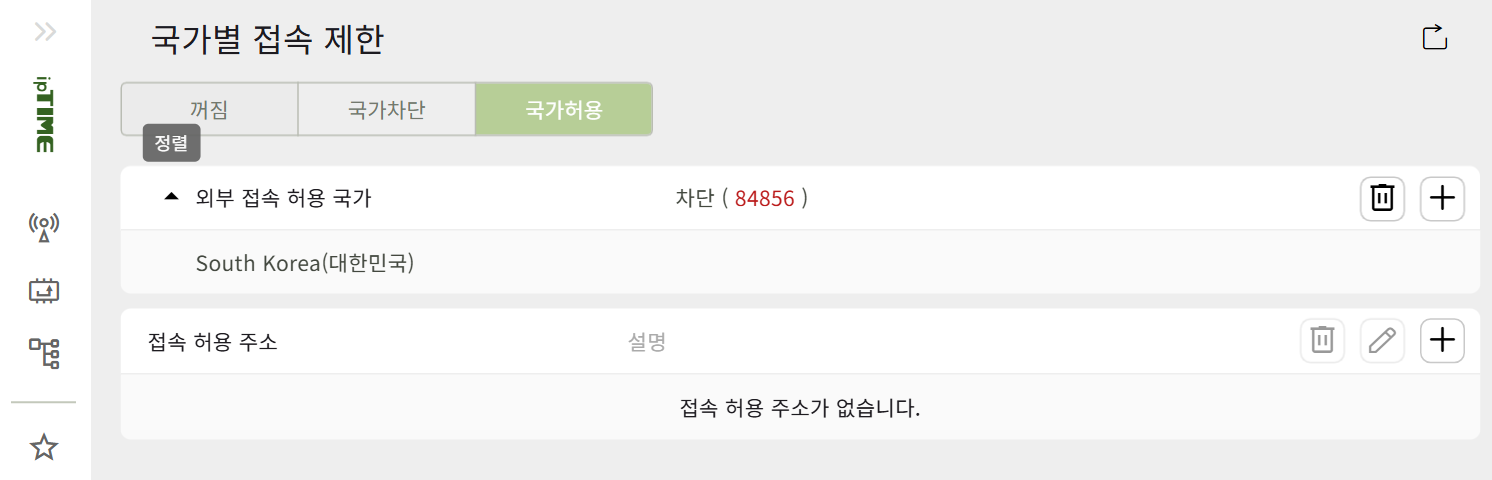
This setting is genuinely useful for security, so leave it on. Instead of turning it off, just change how you issue the certificate.
[02] How to Solve It — First Decide Whether You Need Overseas Access
| Situation | Solution |
|---|---|
| Domestic use only (most personal home servers) | Keep the country restriction + DNS-01 ← this post |
| Overseas access required | Lift the restriction and use HTTP-01, or Cloudflare Tunnel / Tailscale |
DNS-01 never connects to your server directly. It validates by reading a TXT record you’ve placed in DNS, so issuance — and auto-renewal — works even with inbound blocked. Your actual service (443) only needs to serve domestic users anyway, so it never collides with the country restriction.
DuckDNS gives you exactly one TXT slot per domain. So if you try to issue separate certs for several subdomains, you’ll run out of slots. The right move is a single wildcard *.mydomain.duckdns.org. A wildcard validates against one _acme-challenge.mydomain.duckdns.org TXT record, so the slot limit is a non-issue.
[03] Prerequisites
- A DuckDNS domain and token. Following STEP 02 of the previous post, add the domain (
mydomain) and copy the token from the top of the page. - For iptime port forwarding, external
443→192.168.0.22:443is all you need. DNS-01 doesn’t use port 80. You do still need 443 open so domestic users can reach HTTPS — and even with the country restriction on, domestic IPs come in through this 443 just fine. - On the server, you’ll want
dockeranddocker compose(v2), pluscurlanddig.
[04] Issuing the Cert — certbot DNS-01 + DuckDNS hook
The core idea is to attach a small hook script to certbot’s --manual mode — one that adds and removes the DuckDNS TXT record.
4-1. The DuckDNS Hook Script
Create ~/myserver/scripts/duckdns-hook.sh and make it executable.
1
2
3
4
5
6
7
8
9
10
11
12
13
14
15

#!/bin/sh
set -eu
action="${1:-}"
: "${DUCKDNS_DOMAIN:?}"; : "${DUCKDNS_TOKEN:?}"
base="https://www.duckdns.org/update?domains=${DUCKDNS_DOMAIN}&token=${DUCKDNS_TOKEN}"
case "$action" in
  add)   url="${base}&txt=${CERTBOT_VALIDATION}" ;;
  clean) url="${base}&txt=removed&clear=true" ;;
  *) echo "usage: duckdns-hook.sh add|clean" >&2; exit 2 ;;
esac
resp="$(curl -fsS "$url" || wget -qO- "$url")"
echo "duckdns-hook($action) -> $resp" >&2
[ "$action" = add ] && [ "$resp" != OK ] && exit 1
[ "$action" = add ] && sleep "${DUCKDNS_PROPAGATION:-30}"   # wait for TXT propagation
exit 0
You don’t fill in CERTBOT_DOMAIN or CERTBOT_VALIDATION yourself — certbot injects them as environment variables when it runs the hook.
4-2. The certbot Service in docker compose
Take the certbot service from the previous post’s docker-compose.yml and feed it the hook script and the token.
1
2
3
4
5
6
7
8
9
10
11
12

  certbot:
    image: certbot/certbot
    container_name: certbot
    restart: unless-stopped
    env_file:
      - ./duckdns.env          # DUCKDNS_DOMAIN / DUCKDNS_TOKEN / DUCKDNS_PROPAGATION
    volumes:
      - ./data/certbot/conf:/etc/letsencrypt
      - ./data/certbot/www:/var/www/certbot
      - ./scripts:/scripts:ro
    # auto-renew every 12h (reuses the stored manual hook)
    entrypoint: "/bin/sh -c 'trap exit TERM; while :; do certbot renew; sleep 12h & wait $${!}; done;'"
Keep the token in a separate ~/myserver/duckdns.env and lock it down to permission 600.
1
2
3

DUCKDNS_DOMAIN=mydomain
DUCKDNS_TOKEN=your-token-here
DUCKDNS_PROPAGATION=30
4-3. Rehearse With staging Before the Real Issue
Let’s Encrypt production certs are capped at 5 per week. Burn through that limit while debugging your config and you’re stuck waiting, so run --dry-run (staging) once first.
1
2
3
4
5
6
7
8
9

cd ~/myserver
docker compose run --rm --entrypoint certbot certbot certonly \
  --manual --preferred-challenges dns \
  --manual-auth-hook   "/scripts/duckdns-hook.sh add" \
  --manual-cleanup-hook "/scripts/duckdns-hook.sh clean" \
  --cert-name mydomain.duckdns.org \
  -d '*.mydomain.duckdns.org' \
  --email you@example.com --agree-tos --no-eff-email --non-interactive \
  --dry-run
Once you see The dry run was successful., run it again without --dry-run — this time it’s the real issue.
1
2

Successfully received certificate.
Certificate is saved at: /etc/letsencrypt/live/mydomain.duckdns.org/fullchain.pem
There are two traps people reliably step on here.
One: the entrypoint swallows your arguments. If certbot has an auto-renew entrypoint (the infinite renew loop above), then running docker compose run certbot certonly ... lets the entrypoint eat the arguments and certonly never runs. If you only ever see No renewals were attempted and then it stops, this is why. Override it with --entrypoint certbot, as the command above does.
Two: the wildcard cert path. Pinning the lineage name with --cert-name mydomain.duckdns.org saves the cert under live/mydomain.duckdns.org/, which is what lets it line up cleanly with the nginx config path in the next step.
[05] nginx — One 443 per Subdomain, a Single Wildcard Cert
The essentials of ~/myserver/nginx/nginx.conf look like this.
1
2
3
4
5
6
7
8
9
10
11
12
13
14
15
16
17
18
19
20
21
22
23
24
25
26
27
28
29

events {}
http {
  map $http_upgrade $connection_upgrade { default upgrade; '' close; }
  client_max_body_size 50m;
  ssl_protocols TLSv1.2 TLSv1.3;     # certonly does not create options-ssl-nginx.conf, so inline it

  # 80 → 443 redirect (for domestic users)
  server {
    listen 80;
    server_name mydomain.duckdns.org *.mydomain.duckdns.org;
    location / { return 301 https://$host$request_uri; }
  }

  # one 443 server per subdomain — all use the same wildcard cert
  server {
    listen 443 ssl;
    server_name engwrite.mydomain.duckdns.org;
    ssl_certificate     /etc/letsencrypt/live/mydomain.duckdns.org/fullchain.pem;
    ssl_certificate_key /etc/letsencrypt/live/mydomain.duckdns.org/privkey.pem;
    location / {
      proxy_pass http://192.168.0.22:8000;     # no trailing '/' = pass root as-is
      proxy_set_header Host $host;
      proxy_set_header X-Forwarded-Proto $scheme;
      proxy_set_header X-Real-IP $remote_addr;
      proxy_set_header X-Forwarded-For $proxy_add_x_forwarded_for;
    }
  }
  # add the same kind of server block for birthplanner(:8100), cdocs(:8200)
}
1

cd ~/myserver && docker compose down && docker compose up -d
Unlike the HTTP-01 path, certonly doesn’t generate helper files like options-ssl-nginx.conf or ssl-dhparams.pem. Try to include them and nginx will refuse to start, complaining the file is missing. That’s why I wrote ssl_protocols straight into the conf above.
[06] Run Each App at Root (‘/’) — the Real Win of Subdomains
The nice thing about the subdomain approach is that each app just runs at its own root — you never touch base paths. Go the path-based route (/engwrite/) instead and you have to change the base, at which point static-file paths and redirects start breaking one after another. If you tried path-based routing earlier, you’ll want to undo those traces and put everything back at root.
-
Django (engwrite) — in
.envDJANGO_ALLOWED_HOSTS=engwrite.mydomain.duckdns.org,127.0.0.1,localhostCSRF_TRUSTED_ORIGINS=https://engwrite.mydomain.duckdns.org-
USE_HTTPS=true,FORCE_SCRIPT_NAME=(empty, to serve at root) - in settings,
SECURE_SSL_REDIRECT=False(the outer nginx terminates HTTPS)
-
Vite SPA (birthplanner) — drop
baseinvite.config.tsso it defaults to/, remove the React Routerbasename, and rebuild. -
VitePress (cdocs) — remove
base: '/cdocs/'in config so it’s back to/, and serve a prod static build rather than the dev server. The dev server shouldn’t be exposed externally, and its routing breaks anyway.
[07] Verification
1
2
3
4
5
6
7
8
9
10
11
12
13

# Each subdomain from the domestic network (200/301 = OK)
for s in engwrite birthplanner cdocs; do
  curl -Iks "https://$s.mydomain.duckdns.org/" | head -1
done

# Confirm the cert is a wildcard
echo | openssl s_client -servername engwrite.mydomain.duckdns.org \
  -connect mydomain.duckdns.org:443 2>/dev/null | openssl x509 -noout -subject -enddate
# subject= CN = *.mydomain.duckdns.org

# Auto-renew rehearsal (with the stored hook)
cd ~/myserver && docker compose run --rm --entrypoint certbot certbot renew --dry-run
# Congratulations, all simulated renewals succeeded
Open https://engwrite.mydomain.duckdns.org/ in a browser — a padlock and a normal page means you’re done.
[08] Troubleshooting
| Symptom | Cause / Fix |
|---|---|
Timeout during connect (likely firewall problem) |
Inbound from abroad is blocked (country restriction / ISP). Use DNS-01 instead of HTTP-01 (this post) |
Stops after No renewals were attempted
|
The certbot service entrypoint swallowed certonly. Add --entrypoint certbot
|
nginx won’t start: options-ssl-nginx.conf missing
|
certonly doesn’t create this file. Set ssl_protocols etc. inline in nginx |
Host denied access to live/...
|
certbot creates it as root 0700. Run the [ -f ] check inside the container (docker compose run --entrypoint test ...) or use sudo |
| DNS-01 issued but no external access | Check whether 443 is also blocked. Fine for domestic-only; for overseas, lift the restriction or use a tunnel |
| rate limit (5/week) | Always debug failures with --dry-run (staging) |
[09] Wrap-Up
When HTTPS won’t come up on a Korean home server, the real cause is surprisingly often not a port-forwarding mistake but blocked inbound from abroad. Whether your ISP blocked it or you turned on iptime’s country-based restriction, the result is the same: Let’s Encrypt’s port-80 validation can’t reach you.
In that situation, DNS-01 + a DuckDNS wildcard lets you add HTTPS without opening another port and without giving up the country restriction you set for security. As a bonus, the subdomain approach keeps each app at root, so you never wrestle with base paths.
Conversely, if you’re on an ordinary connection where overseas access isn’t blocked, there’s no need to reach for DNS-01 — the simpler HTTP-01 (port-80 webroot) is the better fit. For that, start with DuckDNS + HTTPS Setup on an iptime Router.