
Checking Linux Server Hardware Info - CPU, Memory, Disk, Network
 This post collects commands for inspecting the hardware installed on a server: CPU, memory, disks, network interface cards, GPU, and so on.
 Based on Ubuntu 24.04 Server
[01] Related Commands
| Command | Description |
|---|---|
dmidecode |
Print hardware info from the system DMI (SMBIOS) tables |
free |
Show available and used memory |
lshw |
Extract hardware config such as memory settings, firmware version, CPU speed, and bus speed |
lsblk |
List block device info, derived from the sysfs filesystem |
lscpu |
Print CPU info: architecture, cores/threads, sockets, etc. |
[02] CPU Information
1
2
3
4
5
6

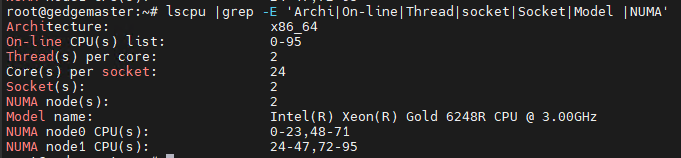
lscpu

# Extract only the relevant fields
# Architecture, number of processors, threads per core, cores per socket, sockets, model name, NUMA info
# Processors = Cores * threads-per-core * sockets
lscpu |grep -E 'Archi|On-line|Thread|socket|Socket|Model |NUMA'
[03] Memory Information
1
2
3
4
5
6
7
8
9
10
11
12
13
14
15
16
17
18
19
20
21
22
23
24
25
26
27
28
29
30
31
32
33
34
35
36
37
38

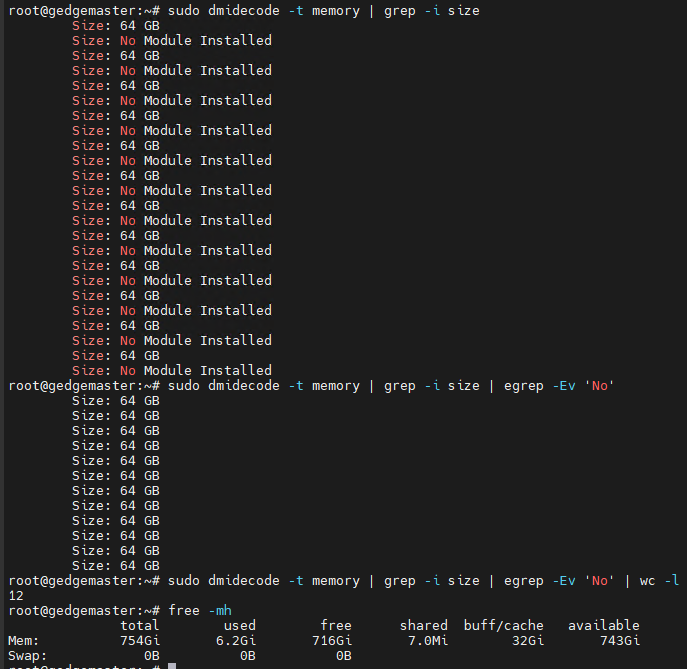
# Show the size of installed memory (including empty slots)
dmidecode -t memory |grep -i size

# Show only the slots that actually have memory installed
dmidecode -t memory |grep -i size | egrep -Ev No

# Count the number of populated memory slots
dmidecode -t memory |grep -i size | egrep -Ev No | wc -l

# Show total memory capacity
free -mh

# When `dmidecode -t memory` output includes lines like "Volatile Size"
# Count total slots = (slots with GB value) + (No Module Installed) - (Volatile Size lines)
dmidecode -t memory | egrep "Size: ([0-9]+ GB|No Module Installed)" |grep -v "Volatile Size:" | wc -l

# List installed memory modules and count them
dmidecode -t memory | egrep "Size: [0-9]+ GB" | grep -v "Volatile Size:"
dmidecode -t memory | egrep "Size: [0-9]+ GB" | grep -v "Volatile Size:"| wc -l

# List empty slots and count them
dmidecode -t memory | egrep "Size: No Module Installed"
dmidecode -t memory | egrep "Size: No Module Installed" | wc -l

# Check the DDR generation (DDR3/DDR4/DDR5) of the installed memory
# lshw shows both generation and speed, e.g. "DIMM DDR4 Synchronous 3200 MHz ..."
lshw -short -C memory

# Check the DDR generation with dmidecode (Type: DDR3/DDR4/DDR5 per installed module)
dmidecode -t memory | grep "Type: DDR"

# Count modules per DDR generation at a glance
dmidecode -t memory | grep "Type: DDR" | sort | uniq -c

# Check the memory clock speed (MHz/MT/s)
# Speed: rated speed of the module / Configured Memory Speed: actual operating speed
# (older dmidecode versions print "Configured Clock Speed" instead)
dmidecode -t memory | grep -i "speed" | grep -v "Unknown"

[04] Disk Information
1
2
3
4
5

# Show disk devices
lsblk

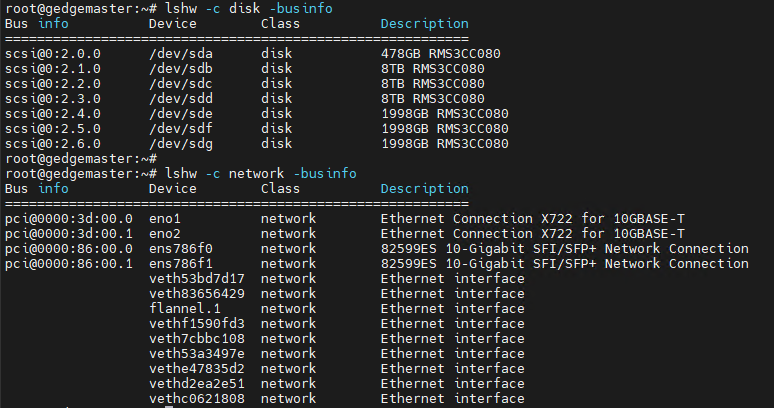
# Show disk devices with bus info
lshw -c disk -businfo
[05] Network Information
1
2

# Show network devices with bus info
lshw -c network -businfo
[06] GPU Information
1
2
3
4
5

# Show display/GPU devices
lshw -C display

# When using an NVIDIA GPU with the driver installed
nvidia-smi